Home > Energy > Energy Guides > What is an Economy 7 Meter and Tariff
What is an Economy 7 Meter and Tariff?
Written by David Walter, Chief Commercial Officer
Last Updated : 10 Sep 2026 - Navigating the complex world of energy tariffs can feel like a daunting task, but understanding your options is crucial for keeping your household bills under control.
An Economy 7 meter and tariff can be a smart, cost-effective choice if you can shift your energy usage to overnight hours. This guide will help you understand how to make the most of Economy 7 and determine if it’s the best fit for your home.
What is Economy 7?
Economy 7 is a specialised electricity tariff that rewards you for using power during off-peak hours, typically overnight. The "7" refers to the seven hours during which electricity is billed at a much cheaper rate than during the day when it’s more expensive.
This tariff is beneficial if you can shift your high-energy consumption to these overnight hours. It is particularly effective for homes that use a significant amount of electricity during the night, such as those with:
Electric storage heaters: Charging at night to release heat during the day.
Immersion water heaters: Setting your hot water to heat while rates are low.
Electric Vehicles (EVs): Charging your car overnight is a powerful way to maximize savings.
The tariff was initially introduced in the 1970s and remains a favourite for savvy users who are willing to adjust their usage habits. With household energy bills in the UK averaging around £150 per month, strategically shifting high-energy tasks-like running dishwashers or washing machines—to the off-peak period could help you save on your annual bills.
How does Economy 7 work?
Unlike traditional energy tariffs, which charge a flat rate regardless of the time of day, Economy 7 meters work on a two-rate system.
Off-peak rate: Cheaper electricity, typically available for seven hours (usually midnight to 7 AM).
Peak rate: A higher rate for electricity used during the daytime
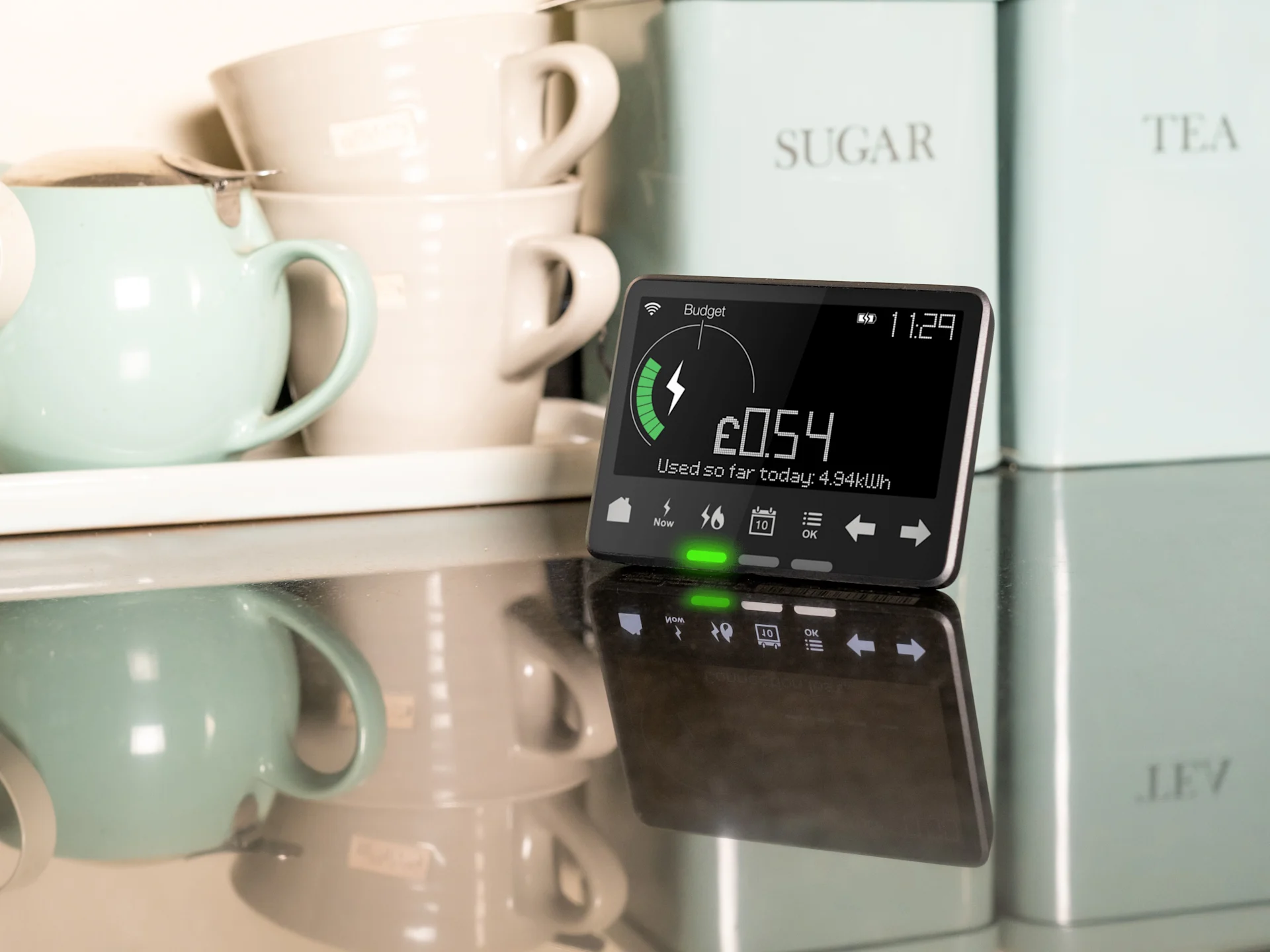
If you're unsure whether your home has been fitted with an Economy 7 meter, one of the biggest giveaways is the display showing two figures rather than one. Some modern Economy 7 meters even display the two rates on the same screen, while older models might require you to press a button to toggle between the readings.
If you have a smart meter, you can see whether you're on an Economy 7 tariff by cycling through the displays to see if a 'normal' and 'low' rate is available. The added benefit of a smart meter is that it sends real-time usage data to your energy provider, which can help you track and optimise your energy usage more effectively. To learn more about smart meters, see our comprehensive smart meter guide.
Take control of your energy costs
Lock in over £350 in savings vs January’s projected price cap and get the cheapest 12-month tariff on the market.
Plus, we’ll throw in up to £250 in Cashback Card credit and up to £400 in switching credit.
Is Economy 7 right for you??
The answer depends on your electricity usage patterns.Economy 7 is generally most effective for homes that use a significant amount of electricity during the night. For those with electric storage heaters or immersion water heaters, the tariff is particularly beneficial, as these appliances can heat up at night when rates are low and release heat throughout the day.
While a common rule of thumb is shifting a significant portion (around 30-40%) of your energy usage to nighttime, the best way to determine value is to review your specific usage patterns with your tariff rates. If most of your electricity use happens during the day, the higher daytime rates could negate any potential savings.
Maximising your savings
To get the most out of an Economy 7 tariff, the goal is to shift as many high-energy tasks as possible to the off-peak period. The real value of being on Economy tariff comes from combining overnight use of heating and hot water with your daily appliances.
Heating & Hot Water: Ensure your water heaters or storage heaters are set to operate exclusively during the cheaper night-time period.
Appliances: Use built-in timers on dishwashers, washing machines, and tumble dryers to run them during the off-peak window.
Small devices: Even charging mobile phones, tablets, or slow cookers during the cheaper period contributes to overall savings.
Want to reduce your energy usage even further? Learn more about energy savings with our guide.
Considering an EV Tariff instead?
If your primary reason for considering Economy 7 is to charge an electric vehicle, our dedicated EV Tariff might be a better fit. It is specifically designed for EV owners and provides cheaper overnight rates without the requirement to shift all your other household energy consumption.
Not sure which is right for you?
If you are unsure whether your current usage patterns make Economy 7 the most cost-effective option, please contact us. We can help you review your tariff and find out if there is a more suitable option for your home.
You can explore our full range of tariffs to see which plan offers the best value for your specific home and needs.
Save time and money on your household bills
Unlock maximum savings on award winning energy, broadband, mobile and insurance.
Up to 10% back on everyday spending with a UW Cashback Card
£400 towards existing provider termination fees and 30 days to change your mind, penalty free
Your local UW Partner will sort it all for you. No stress, just savings and more savings.

How to read an Economy 7 meter
Taking a reading from an Economy 7 meter is slightly different to taking a reading from a standard electricity meter because it tracks two separate numbers at the same time: one for your daytime electricity usage and another for your nighttime usage. The process may vary a little, depending on whether you have a traditional dual-display meter or a modern smart meter model.
Generally, the process for reading an Economy 7 meter is as follows:
1. Locate the display
Economy 7 meters usually have a digital display showing two sets of numbers. These numbers correspond to your electricity usage during peak (daytime) and off-peak (nighttime) periods.
2. Identify the readings
You’ll then need to identify which reading relates to peak and off-peak times:
Daytime usage (“Rate 1” or “Normal”) – This reading shows how much electricity you’ve used during the peak hours, typically from around 8 AM to 11 PM.
Nighttime usage (“Rate 2” or “Low”) – This reading tracks the electricity used during the off-peak hours, usually from 12 AM to 7 AM.
3. Record the numbers
To accurately track your energy usage or provide a meter reading to your energy supplier, make sure you write down both numbers – including any digits before and after the decimal point if they’re shown.
4. Submit the readings
Depending on your energy provider, you can usually submit your meter readings in multiple ways. At UW, we accept meter readings by logging into your online account or via the UW mobile app. Be sure to indicate which reading corresponds to your daytime and nighttime usage to ensure accurate billing.
On smart meters, you might need to press a button to toggle between the two readings. The labels on the display may vary (e.g., "Rate 1" and "Rate 2" or "Low" and "Normal"), but typically "Rate 1" refers to the daytime usage and "Rate 2" to the nighttime.
Do you have a different type of Economy meter?
While Economy 7 is one of the most common multi-rate tariffs, your home might have a different type of setup, such as an Economy 10 or a legacy Restricted Metering Infrastructure (RMI) meter.
These systems often operate differently - for example, Economy 10 offers 10 hours of off-peak that may be spread across different times of the day rather than just at night. You can find out more about these in our dedicated help page - What's an Economy 7 or an Economy 10 meter?
What is Radio Teleswitch (RTS) Meter and how does it work?
Radio Teleswitch (RTS) technology was a system introduced in the 1980s, that allowed energy providers to remotely control mutli-rate meters by switch between peak and off-peak rates on these meters without users needing to manually adjust them. The system operated via radio signals, automatically switching your meter to the correct tariff at the appropriate times.
Radio Teleswitch Meters are the specific type of Economy 7 or multi-rate meters that rely on the RTS system to switch between different electricity rates. These meters received radio signals from the national grid, instructing them to change from the peak daytime rate to the cheaper off-peak nighttime rate and vice versa.
Important updates around Radio Teleswitch Meters
From June 30, 2026, the Radio Teleswitch (RTS) service was officially switched-off. This change is part of the UK's wider efforts to modernise the energy system, including the widespread rollout of smart meters, which offer advanced features compared to the older RTS technology.
If you have an older meter that relied on this signal, it may no longer be switching between peak and off-peak rates automatically, which can impact your billing and hot water or heating controls. Find out how you can upgrade to a smart meter for free, here.
You can find more information on our RTS help page.
Do I need to switch from Economy 7 or multi-rate tariff?
Although support for RTS has been discontinued, this doesn't mean that you automatically need to switch from Economy 7 to a standard energy tariff.
For customers who have already been given a newer meter, such as a smart meter, this change will have no effect..
If you have a smart meter, your Economy 7 or multi-rate tariff will continue to function normally without disrupting your service.
If you currently still have an older meter model, your energy provider should’ve got in touch with you to arrange a replacement and potentially an upgrade to a smart meter.
If you still have a Radio Teleswitch Meter, contact us here.
Is the Economy tariff still right for me if I have an RTS meter?
If your lifestyle or energy usage has changed — perhaps you're now using more electricity during the day than at night - it's worth reassessing whether Economy 7 is still the best option for you. The higher daytime rates associated with Economy 7 can outweigh the savings from off-peak usage if most of your energy consumption happens during peak hours.
How to switch from an Economy 7 tariff to a standard energy tariff
If Economy 7 no longer suits your needs or you're not benefiting from it, switching to a standard energy tariff is a simple process, but it's important to consider a few key steps to ensure a smooth transition and to determine whether the switch is right for you.
These are:
1. Contact your energy provider
To kick-start the switch, reach out to your existing energy provider. They will be able to guide you through the process, which may involve changing your current meter if it’s designed specifically for Economy 7. Some older Economy 7 meters may not be compatible with standard tariffs, so your provider might suggest upgrading to a smart meter. These models automatically adjust to a wide range of different tariff types, making them a flexible option if you plan to switch.
2. Compare tariffs
While speaking with your energy provider, ask about the standard tariffs they have on offer. There are often a variety of options available, including fixed-rate and variable-rate plans. The differences can be seen below:
Fixed-rate tariffs – These provide a consistent rate over a set period, regardless of external influences.
Variable-rate tariffs — With this tariff, rates may fluctuate based on market conditions.
3. Schedule the meter change (if necessary)
If your current Economy 7 or multi-rate meter needs to be replaced, your energy provider will arrange a time to install the new meter. This process is usually quick and straightforward, and the installer will ensure that your new meter is correctly configured for your chosen tariff.
4. Monitor your new tariff
After switching to a standard tariff, it’s a good idea to monitor your energy usage and bills for the first few months. This will help you make sure that the new tariff is actually saving you money. If you notice any issues or have questions, contact your provider for assistance.
If you’re planning on switching to a different tariff, why not get a quote at UW today and see how much you could save with our fixed and variable energy tariffs? Or, take a look at our guide if you’re not sure who your current energy provider is.
The last switch you’ll ever make
Get up to £250 Cashback Card credit and £400 to help you switch. We promise you'll save money, or we'll pay you double the difference.
Find a Utility Warehouse Partner to help you get your energy, broadband, mobile and insurance sorted. We're here to make your life easier by getting your home services in one place.
“Whether you’re looking for a variable tariff or prefer a fixed tariff for total peace of mind, we offer energy prices consistently below the price cap when you bundle with our other award-winning services. We can get you switched over in as little as two days with no disruption to your supply. We offer even greater savings when you upgrade to a free smart meter so you never have to worry about giving a meter reading again.”
David Walter - Chief Commercial Officer

Frequently asked questions
The exact start and finish times for Economy 7 can vary depending on your location and energy provider. Typically, the off-peak period begins somewhere around midnight and lasts for six to seven hours, ending between 6 AM and 7 AM. To find out the specific times for your tariff, you can check your electricity bill, contact your energy provider, or even look at your Economy 7 meter if it displays the switching times.
Yes, you can get a smart meter if you're on an Economy 7 tariff. Smart meters are fully compatible with Economy 7 and will continue to track your electricity usage during peak and off-peak periods. The benefit of a smart meter is that it automatically sends data straight to your energy provider, ensuring your bills are always accurate and making it easier for you to monitor your energy usage.
No, Economy 7 tariffs are designed only for electricity usage. In particular, they’re meant to be helpful for households that use lots of electricity for heating or hot water, not gas.

Added a mobile SIM card
I spoke to Chloe and she was very…
Very pleasant and helpful young…
Ready to switch? See our other options
To explore your options and find the best deal, browse our range of electricity tariffs or discover all our energy packages — including fixed and variable rates to suit your household's needs.
Related articles
A Complete Guide to Smart Meters: What They Are And How They Can Save You Money
Nobody likes having high energy bills – we can all agree on that. Which is why knowing how to be more efficient and reduce your usage is super important.

Energy saving tips
How to save electricity and lower your energy bills
Knowing how to save energy at home isn't about massive life overhauls; it's about making small, clever tweaks to how you run your home.